There are many use cases for consolidating and transforming email tracking data in Salesforce Marketing Cloud, and they are usually related to a requirement for sending the tracking data in a given format to external systems, such as databases and data warehouses. We will use Salesforce Marketing Cloud’s Data Views to get all the details of the email job, opens, clicks, bounces and unsubscribes, as well as subscriber details.
Create a target Data Extension
Before we start with the query, let’s first create a target Data Extension to hold the results. The Data Extension should have the following columns and it shouldn’t have any primary keys. It also doesn’t need to be sendable or testable.
Name
Data Type
Length
Nullable
SubscriberKey
Text
100
no
EmailAddress
Email
255
no
EmailName
Text
100
yes
EmailSubject
Text
200
yes
FromName
Text
130
yes
FromEmail
Text
100
yes
SentDate
Date
yes
OpenDate
Date
yes
NumberOfOpens
Number
yes
ClickDate
Date
yes
NumberOfClicks
Number
yes
NumberOfLinksClicked
Number
yes
BouncedDate
Date
yes
BounceCategory
Text
50
yes
UnsubscribedDate
Date
yes
Joining data from Data Views
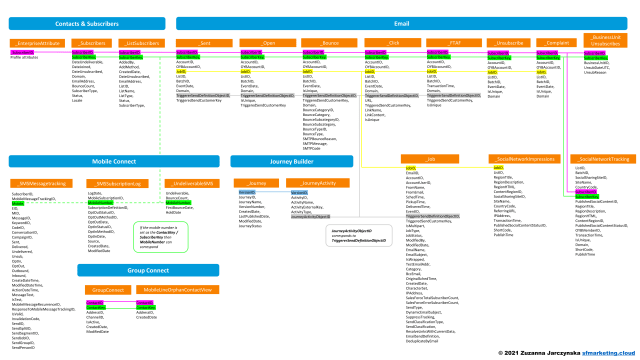
When working with data from Data Views in SQL, it’s important to correctly join the data from the different tables. Even though the diagram below shows that common columns that can be used for joining data are SubscriberID and JobID, you should in fact join on more than those two columns to get correct results from your queries.
This is especially important for Journey Builder sends, where every email that is sent out individually will have a different BatchID value assigned, so in case the same person enters the same journey multiple times and gets the same email more than once, you could potentially end up with incorrect tracking data if you only join on SubscriberID and JobID.
The most reliable way to join tracking data from Data Views is to actually use all the common column names that are present in the _Sent, _Open, _Click, _Bounce and _Unsubscribe tables, just like in the example below, where we are joining data on JobID, ListID, BatchID and SubscriberID:
This file contains hidden or bidirectional Unicode text that may be interpreted or compiled differently than what appears below. To review, open the file in an editor that reveals hidden Unicode characters.
Learn more about bidirectional Unicode characters
In our query, we will add a couple of subqueries which will allow us to get the total number of opens, clicks and URLs clicked per subscriber per email send. Below are the details of the three subqueries.
Total number of opens:
This file contains hidden or bidirectional Unicode text that may be interpreted or compiled differently than what appears below. To review, open the file in an editor that reveals hidden Unicode characters.
Learn more about bidirectional Unicode characters
This file contains hidden or bidirectional Unicode text that may be interpreted or compiled differently than what appears below. To review, open the file in an editor that reveals hidden Unicode characters.
Learn more about bidirectional Unicode characters
This file contains hidden or bidirectional Unicode text that may be interpreted or compiled differently than what appears below. To review, open the file in an editor that reveals hidden Unicode characters.
Learn more about bidirectional Unicode characters
For our final query, we will combine the data from all Data Views mentioned above with the three subqueries and we will add one more additional join with the _ListSubscribers Data View to be able to display the email addresses of subscribers. If you’re running this query in a Child BU, make sure to use ent._ListSubscribers instead of _ListSubscribers.
This file contains hidden or bidirectional Unicode text that may be interpreted or compiled differently than what appears below. To review, open the file in an editor that reveals hidden Unicode characters.
Learn more about bidirectional Unicode characters
You can now automate this query in Automation Studio and create a recurring export of the results and send them to the FTP for consumption by external systems.

 sfmarketing.cloud
Hi Zuzanna
Thanks for the ‘SQL to consolidate tracking data’.
With this query I get only unique records means first open and first click. How can I get latest opendate and latest clickdate?
LikeLike
Hi Zuzanna,
How do you add the emailname from a child BU into this?
Thanks
LikeLike
Hi Zuzanna ,
How Can we count no of sent dor same email address
thanks
Seema
LikeLike
Hi how can we write sql query those who have not open the email for a particular journey?
LikeLike
Can I pull the subscribers FirstName, LastName, Address?
LikeLike
Does this query work for you? It’s timing out for me in Query Studio
LikeLike
Does this work for you? Even just half the query is timing out for me in Query Studio.
LikeLike
Hi
I need to include what email templates sent for the particular person
LikeLike
why are you joining two times open and click when it could had been managed by one join being used to count open and clicks
LikeLike
This is very helpful! Do ou have a similar solution for consolidating tracking data for MobileConnect and/or MobilePush in SFMC?
LikeLike
does the click data view work for SMS Mobile connect as well?
LikeLike
Hi Avril, it’s for email only, I’m currently working on an article about tracking sms clicks in SFMC
LikeLike